
SaaS Explainer Videos Built From Your Product
SaaS Explainer Videos Built From Your Product
SaaS Explainer Videos Built From Your Product
UI-driven explainer videos built from your live product or approved pre-launch designs. Show buyers what your software does before a sales call.
UI-driven explainer videos built from your live product or approved pre-launch designs. Show buyers what your software does before a sales call.
TRUSTED BY
TRUSTED BY




PROBLEM
Your SaaS Product Is Powerful. Does It Look That Way at First Glance?
Complex dashboards, multi-step workflows, and technical features create friction before anyone books a demo. A prospect isn’t going to read your docs to understand what you do. They need to see it, immediately:
- what problem your software actually solves
- how the workflow runs from start to finish
- why it’s different from whatever they’re already using
That’s what a well-made product video does. It handles the explanation your homepage copy can’t carry on its own.
PROBLEM
Your SaaS Product Is Powerful. Does It Look That Way at First Glance?
Complex dashboards, multi-step workflows, and technical features create friction before anyone books a demo. A prospect isn’t going to read your docs to understand what you do. They need to see it, immediately:
- what problem your software actually solves
- how the workflow runs from start to finish
- why it’s different from whatever they’re already using
That’s what a well-made product video does. It handles the explanation your homepage copy can’t carry on its own.
SAAS PROJECTS
A Recent SaaS Launch Video, Start to Finish
Below is one full case study: the brief, what we built, and the result. For more, see the complete portfolio.
SAAS PROJECTS
A Recent SaaS Launch Video, Start to Finish
Below is one full case study: the brief, what we built, and the result. For more, see the complete portfolio.


Challenge: Tiponline needed a 55-second launch video for their AI ordering assistant: showing the staff shortage pain, walking through the mobile UI flow, and positioning them as the leading POS for the halal restaurant market in North America.
Solution: Opened with real restaurant footage and “Help Wanted” signs to hook the right audience, then animated the full AI interface: guest chat, menu questions, payment flow, and real-time kitchen display sync. All built from the actual app UI.
Result: “He quickly understood our product - from Halal POS features to restaurant tech - and turned complex software features into simple, engaging reels. Fast edits and great communication. Highly recommended.” - Emin Gara, Founder, Tiponline POS. Delivered in 5 days. 4.5/5 verified review on Clutch.
Challenge: Tiponline needed a 55-second launch video for their AI ordering assistant: showing the staff shortage pain, walking through the mobile UI flow, and positioning them as the leading POS for the halal restaurant market in North America.
Solution: Opened with real restaurant footage and “Help Wanted” signs to hook the right audience, then animated the full AI interface: guest chat, menu questions, payment flow, and real-time kitchen display sync. All built from the actual app UI.
Result: “He quickly understood our product - from Halal POS features to restaurant tech - and turned complex software features into simple, engaging reels. Fast edits and great communication. Highly recommended.” - Emin Gara, Founder, Tiponline POS. Delivered in 5 days. 4.5/5 verified review on Clutch.
Challenge: Tiponline needed a 55-second launch video for their AI ordering assistant: showing the staff shortage pain, walking through the mobile UI flow, and positioning them as the leading POS for the halal restaurant market in North America.
Solution: Opened with real restaurant footage and “Help Wanted” signs to hook the right audience, then animated the full AI interface: guest chat, menu questions, payment flow, and real-time kitchen display sync. All built from the actual app UI.
Result: “He quickly understood our product - from Halal POS features to restaurant tech - and turned complex software features into simple, engaging reels. Fast edits and great communication. Highly recommended.” - Emin Gara, Founder, Tiponline POS. Delivered in 5 days. 4.5/5 verified review on Clutch.
BEFORE / AFTER
BEFORE / AFTER
48 Pages of Docs. One Video
For SaaS founders, product marketers, and growth teams who need prospects to understand the product before asking for a demo, not during the sales call, and not after reading a 48-page manual.
BEFORE / AFTER
48 Pages of Docs. One Video
For SaaS founders, product marketers, and growth teams who need prospects to understand the product before asking for a demo, not during the sales call, and not after reading a 48-page manual.

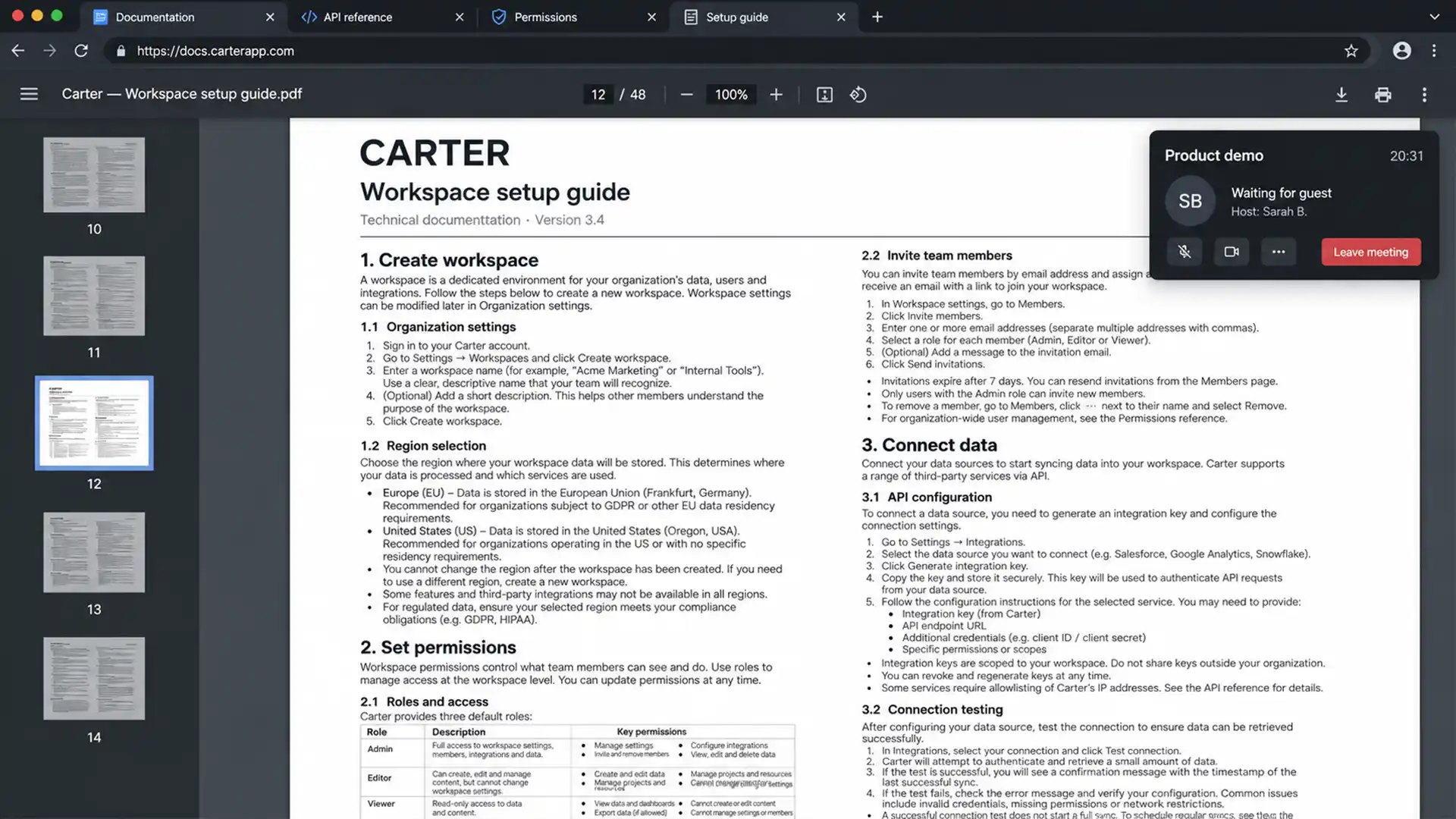
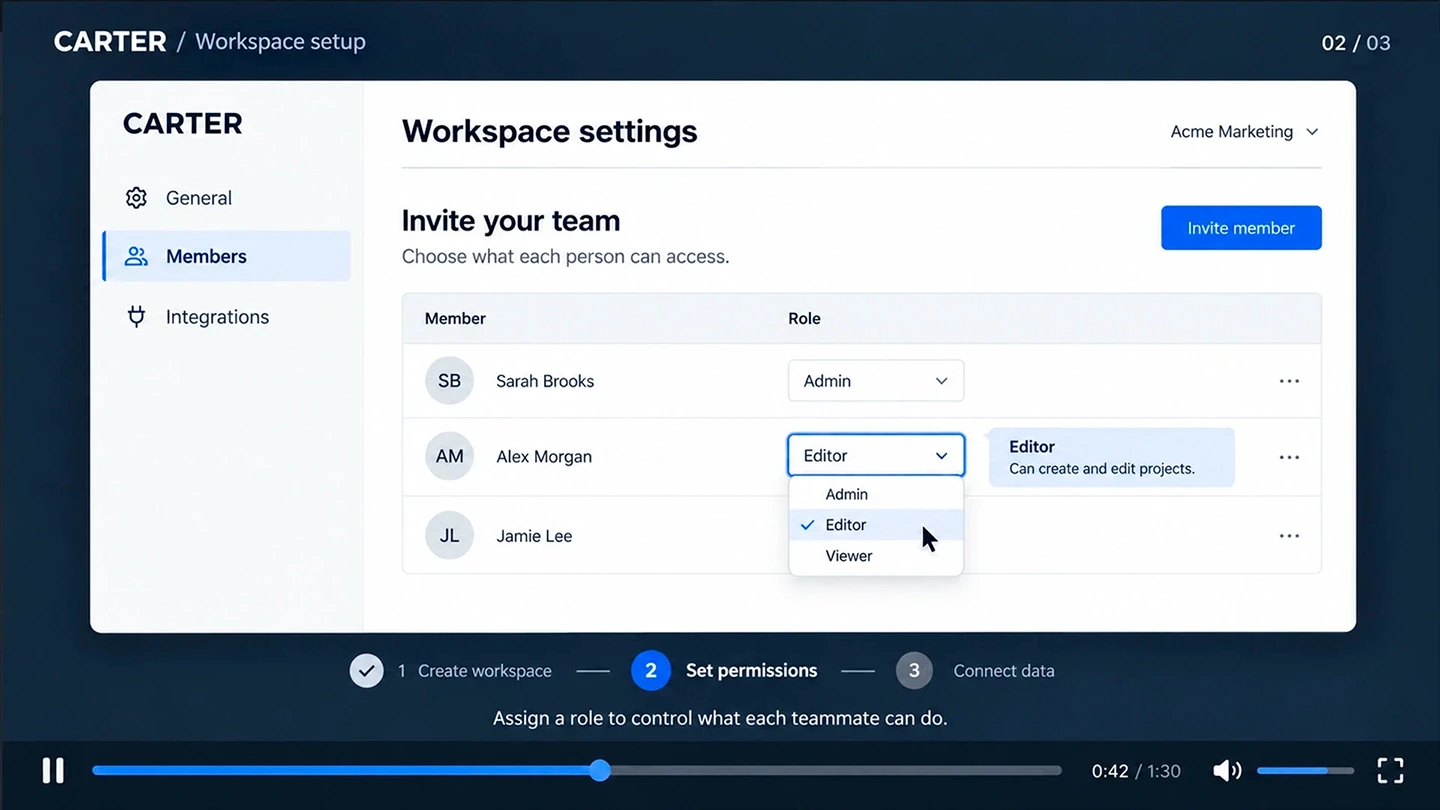
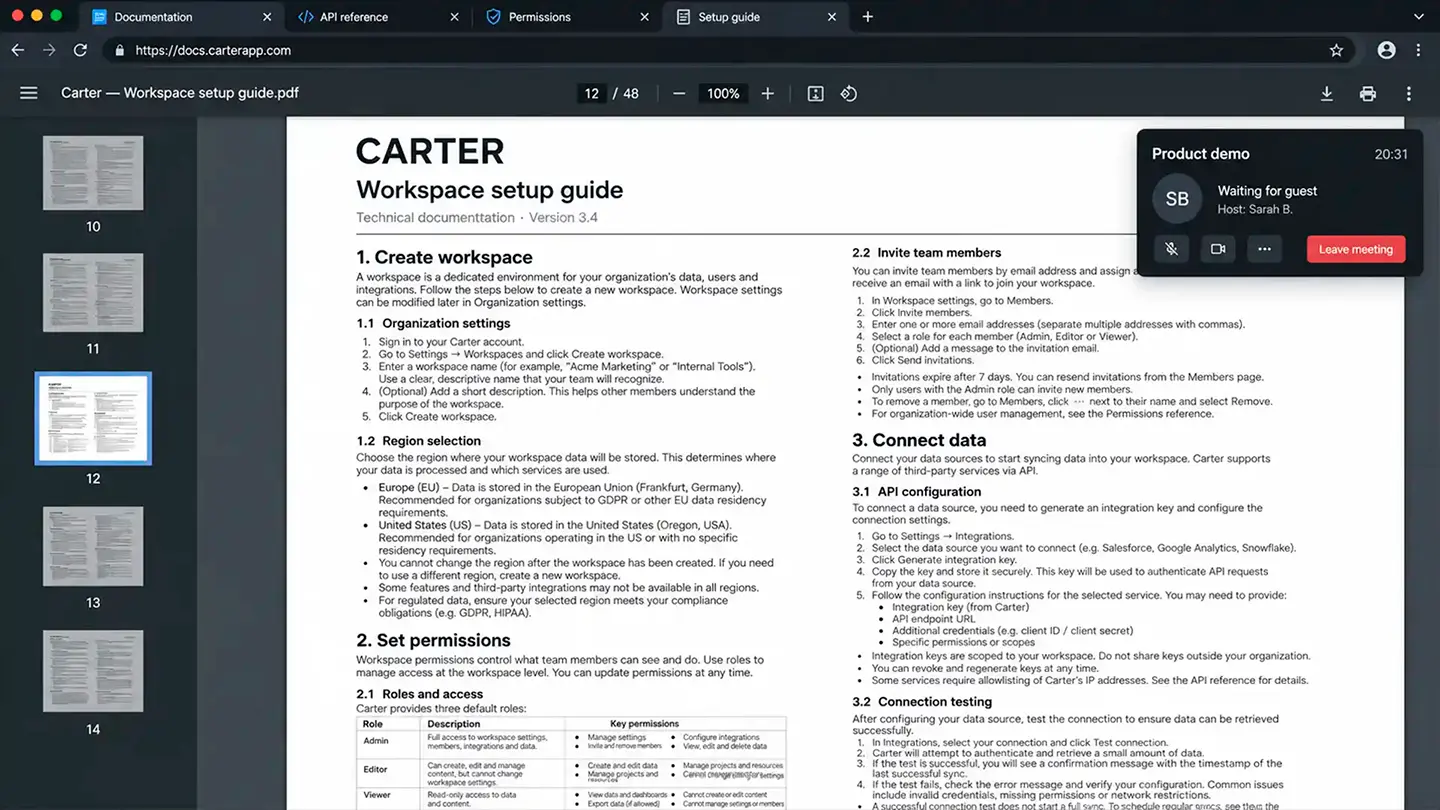
Before: A prospect skips the 48-page manual and shows up to a demo cold, if they show up at all.
After: One video helps prospects understand what the product does, why it matters, and how it could fit into their workflow before they talk to sales.
GET STARTED
Got a complex SaaS product and no good way to explain it?
We help B2B teams explain technical software with videos prospects actually watch and understand.
GET STARTED
Got a complex SaaS product and no good way to explain it?
We help B2B teams explain technical software with videos prospects actually watch and understand.
USE CASE
Built For Products That Are Hard To Explain
This works best when a screenshot alone can’t carry the story: multi-step backend flows, dashboards with more going on than a first-time viewer can parse, or a category new enough that buyers don’t have a mental model for it yet.
If prospects struggle to follow your product before you reach its core value, that’s exactly the gap this closes.
USE CASE
Built For Products That Are Hard To Explain
This works best when a screenshot alone can’t carry the story: multi-step backend flows, dashboards with more going on than a first-time viewer can parse, or a category new enough that buyers don’t have a mental model for it yet.
If prospects struggle to follow your product before you reach its core value, that’s exactly the gap this closes.
DEFINITION
DEFINITION
What is a SaaS Explainer Video?
A SaaS explainer video is a short, product-focused animation that shows a buyer what your software does, why they should care, and how it solves their specific problem, usually in under 90 seconds.
We’ve built these for companies ranging from marketing automation platforms to restaurant POS systems. The format changes; the goal doesn’t: help prospects understand the product before they book a demo, and drive adoption without putting it all on a sales rep.
Not sure an explainer is the right format? Our guide to SaaS video types and examples compares explainers, product demos, UI animation, and screen recording.
Looking for something else? Explore all projects.
DEFINITION
What is a SaaS Explainer Video?
A SaaS explainer video is a short, product-focused animation that shows a buyer what your software does, why they should care, and how it solves their specific problem, usually in under 90 seconds.
We’ve built these for companies ranging from marketing automation platforms to restaurant POS systems. The format changes; the goal doesn’t: help prospects understand the product before they book a demo, and drive adoption without putting it all on a sales rep.
Not sure an explainer is the right format? Our guide to SaaS video types and examples compares explainers, product demos, UI animation, and screen recording.
Looking for something else? Explore all projects.
WHY US
WHY US
Why SaaS Companies Work With Us
WHY US
Why SaaS Companies Work With Us
Built From Your Product, Not a Mockup
What makes a SaaS explainer land isn’t the animation, it’s whether the video is built from your actual product, not a generic mockup. A fake UI doesn’t help a prospect trust what they’re buying: one built from the real interface and workflow does.
You brief us once. Bulat is the one animating it, not someone relaying your notes to whoever’s free that week.
60fps / <1MB
For Customers.ai, we converted and redrew brand logos, worked with over 100 animation layers, and delivered a homepage Lottie animation at just 930 KB.
Figma UI
For SORCE, it meant pulling real screens out of Figma and animating them frame-accurate, so the video looked like the product a new user would actually open, not a polished approximation of it.
Built From Your Product, Not a Mockup
What makes a SaaS explainer land isn’t the animation, it’s whether the video is built from your actual product, not a generic mockup. A fake UI doesn’t help a prospect trust what they’re buying: one built from the real interface and workflow does.
You brief us once. Bulat is the one animating it, not someone relaying your notes to whoever’s free that week.
60fps / <1MB
For Customers.ai, we converted and redrew brand logos, worked with over 100 animation layers, and delivered a homepage Lottie animation at just 930 KB.
Figma UI
For SORCE, it meant pulling real screens out of Figma and animating them frame-accurate, so the video looked like the product a new user would actually open, not a polished approximation of it.
FORMATS
Where SaaS Explainer Videos Fit
Different stages of the buyer journey need different versions of the same product story.
FORMATS
Where SaaS Explainer Videos Fit
Different stages of the buyer journey need different versions of the same product story.
Homepage Explainers
Introduce the product, show the core problem it solves, and help visitors understand the value before they book a demo.
Feature Launch Videos
Explain what a new feature does, why it matters, and how it fits into the product without turning the launch into a technical walkthrough.
Sales Enablement Videos
Give sales teams a concise product story for outbound, pitch decks, follow-ups, and conversations with prospects.
Customer Success Videos
Help existing customers understand key features, new capabilities, and product value without another live explanation.
Homepage Explainers
Introduce the product, show the core problem it solves, and help visitors understand the value before they book a demo.
Feature Launch Videos
Explain what a new feature does, why it matters, and how it fits into the product without turning the launch into a technical walkthrough.
Sales Enablement Videos
Give sales teams a concise product story for outbound, pitch decks, follow-ups, and conversations with prospects.
Customer Success Videos
Help existing customers understand key features, new capabilities, and product value without another live explanation.
Need an interface-first walkthrough? See our SaaS Product Demo Videos. For short UI motion on your website, see UI Animation for SaaS.
Need an interface-first walkthrough? See our SaaS Product Demo Videos.
For short UI motion on your website, see UI Animation for SaaS.
PROCESS
Production Process
Four steps, from first brief to final delivery.
PROCESS
Production Process
Four steps, from first brief to final delivery.
01 / 04
Discovery & Messaging
We figure out who this video needs to convince and what it needs them to do next.
02 / 04
Script & Storyboard
We turn your product into a clear script, then map out the key scenes in a storyboard before animation begins.
03 / 04
Design & Motion
Custom vector animation, UI motion, and sound design. AI-generated English voiceover is optional and quoted separately during scoping.
04 / 04
Final Delivery
Exports optimized for wherever it's going live: website, sales deck, or paid ad.
01 / 04
Discovery & Messaging
We figure out who this video needs to convince and what it needs them to do next.
02 / 04
Script & Storyboard
We turn your product into a clear script, then map out the key scenes in a storyboard before animation begins.
03 / 04
Design & Motion
Custom vector animation, UI motion, and sound design. AI-generated English voiceover is optional and quoted separately during scoping.
04 / 04
Final Delivery
Exports optimized for wherever it's going live: website, sales deck, or paid ad.
01 / 04
Discovery & Messaging
We figure out who this video needs to convince and what it needs them to do next.
02 / 04
Script & Storyboard
We turn your product into a clear script, then map out the key scenes in a storyboard before animation begins.
03 / 04
Design & Motion
Custom vector animation, UI motion, and sound design. AI-generated English voiceover is optional and quoted separately during scoping.
04 / 04
Final Delivery
Exports optimized for wherever it's going live: website, sales deck, or paid ad.
ASSETS
Figma & Asset Handling
How we turn your raw interface files into motion that matches your real product.
ASSETS
Figma & Asset Handling
How we turn your raw interface files into motion that matches your real product.
From Figma to Motion
From Figma to Motion
Share your Figma file and we’ll extract the vector layers, clean them up, and rebuild your UI so it matches your actual product, not an approximation.
Pre-Launch Mode
Pre-Launch Mode
If your product is pre-launch, we can work straight from wireframes or specs, so your video is ready before rollout.
DELIVERY
Video Files Built for Web Speed
Exported specifically for how it’ll be embedded, not just how it looks on screen.
DELIVERY
Video Files Built for Web Speed
Exported specifically for how it’ll be embedded, not just how it looks on screen.
Dual Formats
MP4 and WebM, compressed at the right bitrate for how the video will be embedded.
Performance First
We provide a poster frame, lightweight web-ready exports, and lazy-loading guidance for your web team.
Cloud Hosting Ready
If you use Mux, Cloudflare Stream, or Vimeo, we prep assets in whatever format your host requires.
Dual Formats
MP4 and WebM, compressed at the right bitrate for how the video will be embedded.
Performance First
We provide a poster frame, lightweight web-ready exports, and lazy-loading guidance for your web team.
Cloud Hosting Ready
If you use Mux, Cloudflare Stream, or Vimeo, we prep assets in whatever format your host requires.
DELIVERABLES
What’s Included
All files and rights, delivered when the project wraps.
Video files (4K, MP4, WebM)
Sound design, with optional AI-generated English voiceover if included in the agreed project scope
Commercial usage rights for the agreed final deliverables
After Effects source files, available on request if included in the agreed project scope
DELIVERABLES
What’s Included
All files and rights, delivered when the project wraps.
Video files (4K, MP4, WebM)
Sound design, with optional AI-generated English voiceover if included in the agreed project scope
Commercial usage rights for the agreed final deliverables
After Effects source files, available on request if included in the agreed project scope
PRICING
Project Scoping & Investment
Fixed-price quotes tailored to your exact runtime and UI complexity.
PRICING
Project Scoping & Investment
Fixed-price quotes tailored to your exact runtime and UI complexity.
Focused SaaS Explainer: From $1,500. One focused product story or main message, typically covering one primary workflow, using existing product and brand assets for one main video deliverable. Complex Explainer Production: From $2,500. Multiple workflows or original assets, substantial UI preparation or rebuilding, significant custom illustration or 3D, or more involved production requirements. Every project is quoted at a fixed price before production starts, based on runtime, complexity, and the amount of UI work involved.
Focused SaaS Explainer
From $1,500
One focused product story or main message, typically covering one primary workflow, using existing product and brand assets for one main video deliverable.
Complex Explainer Production
From $2,500
Multiple workflows or original assets, substantial UI preparation or rebuilding, significant custom illustration or 3D, or more involved production requirements.
Every project is quoted at a fixed price before production starts, based on runtime, complexity, and the amount of UI work involved.
FIT & EXPECTATIONS
Is This the Right Fit for Your Team?
Let’s make sure our workflows align before we start.
FIT & EXPECTATIONS
Is This the Right Fit for Your Team?
Let’s make sure our workflows align before we start.
NOT A GOOD FIT IF
NOT A GOOD FIT IF
You need the cheapest screen recording on the market, or require something turned around overnight without a proper script pass.
BEST FIT FOR
BEST FIT FOR
SaaS teams who think of the explainer as a repeatable asset: something that lives on the homepage, shows up in outbound, and runs on sales calls, not a one-off thing.
COMMON QUESTIONS
SaaS Explainer Video FAQ
Answers to the most common questions about process, timelines, and collaboration.
COMMON QUESTIONS
SaaS Explainer Video FAQ
Answers to the most common questions about process, timelines, and collaboration.
How much does a SaaS explainer video cost?
Focused SaaS Explainer projects start at $1,500 for one focused product story or main message, typically one primary workflow, using existing product and brand assets for one main video deliverable. Complex Explainer Production starts at $2,500 for multiple workflows or original assets, substantial UI preparation or rebuilding, significant custom illustration or 3D, or more involved production requirements. An extra aspect ratio, export, cutdown, or small illustration does not automatically make a project complex. Every project is quoted at a fixed price before we start - no hourly billing, no surprises.
How long does a SaaS explainer video take?
Most projects take 7–14 days. More complex work - multiple videos or custom animation styles - typically runs 4–6 weeks.
What do you need from our team to start?
Access to your Figma file, product docs, or a short written brief to align on messaging.
What is the difference between a SaaS explainer video and a product demo video?
An explainer video focuses on the business problem and why your software is the answer. A product demo video focuses on the interface itself - specific workflows, screens, and user interactions.
Can you create videos for SaaS products that aren't launched yet?
Yes. We regularly work with pre-launch teams - from Figma prototypes and wireframes to early product builds. The video can be ready before your official rollout.
Do you understand technical SaaS products?
Yes - most of this job is translating complex interfaces and workflows into something a non-technical buyer can follow in under 90 seconds. That's the core skill, not a bonus.
Can you work with our existing brand and product assets?
Yes. Whether you have Figma files, UI screens, brand guidelines, or component libraries, we can build a consistent motion system around your product.
Can you adapt the video for LinkedIn ads?
Yes. We can re-cut the main video into horizontal, vertical, or square formats for paid social and LinkedIn campaigns.
Do you provide source files?
Yes. Organized Adobe After Effects (.AEP) source files are available on request when included in the agreed project scope. Please mention this when requesting a quote.
Do you work with SaaS companies in the US and Europe?
Yes. We work remotely with SaaS companies, startups, and product teams across the US and Europe. Async-first, so time zones don't slow things down.
How much does a SaaS explainer video cost?
Focused SaaS Explainer projects start at $1,500 for one focused product story or main message, typically one primary workflow, using existing product and brand assets for one main video deliverable. Complex Explainer Production starts at $2,500 for multiple workflows or original assets, substantial UI preparation or rebuilding, significant custom illustration or 3D, or more involved production requirements. An extra aspect ratio, export, cutdown, or small illustration does not automatically make a project complex. Every project is quoted at a fixed price before we start - no hourly billing, no surprises.
How long does a SaaS explainer video take?
Most projects take 7–14 days. More complex work - multiple videos or custom animation styles - typically runs 4–6 weeks.
What do you need from our team to start?
Access to your Figma file, product docs, or a short written brief to align on messaging.
What is the difference between a SaaS explainer video and a product demo video?
An explainer video focuses on the business problem and why your software is the answer. A product demo video focuses on the interface itself - specific workflows, screens, and user interactions.
Can you create videos for SaaS products that aren't launched yet?
Yes. We regularly work with pre-launch teams - from Figma prototypes and wireframes to early product builds. The video can be ready before your official rollout.
Do you understand technical SaaS products?
Yes - most of this job is translating complex interfaces and workflows into something a non-technical buyer can follow in under 90 seconds. That's the core skill, not a bonus.
Can you work with our existing brand and product assets?
Yes. Whether you have Figma files, UI screens, brand guidelines, or component libraries, we can build a consistent motion system around your product.
Can you adapt the video for LinkedIn ads?
Yes. We can re-cut the main video into horizontal, vertical, or square formats for paid social and LinkedIn campaigns.
Do you provide source files?
Yes. Organized Adobe After Effects (.AEP) source files are available on request when included in the agreed project scope. Please mention this when requesting a quote.
Do you work with SaaS companies in the US and Europe?
Yes. We work remotely with SaaS companies, startups, and product teams across the US and Europe. Async-first, so time zones don't slow things down.
GET STARTED
Make Your SaaS Product Easier to Understand
Make Your SaaS Product Easier to Understand
Let’s build a video that gets your next prospect up to speed before your sales team says a word.
GET STARTED
Make Your SaaS Product Easier to Understand
Let’s build a video that gets your next prospect up to speed before your sales team says a word.