
UI Animation for SaaS Websites
UI Animation for SaaS Websites
UI Animation for SaaS Websites
Custom UI loops, feature animations, and Lottie assets built from your live interface or approved Figma designs. Show visitors how a feature works on your SaaS website.
Custom UI loops, feature animations, and Lottie assets built from your live interface or approved Figma designs. Show visitors how a feature works on your SaaS website.
TRUSTED BY
TRUSTED BY





PROBLEM
Show the Workflow Behind the Screen
When a feature depends on several steps, a screenshot can leave the sequence unclear. What does the user select? What changes in the interface? What result appears?
UI animation connects those steps inside your page. A filter updates a report. A new lead enters a workflow. A guest receives a check-in confirmation.
We choose the interaction that supports your page’s message, then animate it so visitors can follow the action and its outcome.
PROBLEM
Show the Workflow Behind the Screen
When a feature depends on several steps, a screenshot can leave the sequence unclear. What does the user select? What changes in the interface? What result appears?
UI animation connects those steps inside your page. A filter updates a report. A new lead enters a workflow. A guest receives a check-in confirmation.
We choose the interaction that supports your page’s message, then animate it so visitors can follow the action and its outcome.
SAAS PROJECTS
UI Animation in Practice
Two projects showing how motion can support different parts of a SaaS website.
SAAS PROJECTS
UI Animation in Practice
Two projects showing how motion can support different parts of a SaaS website.
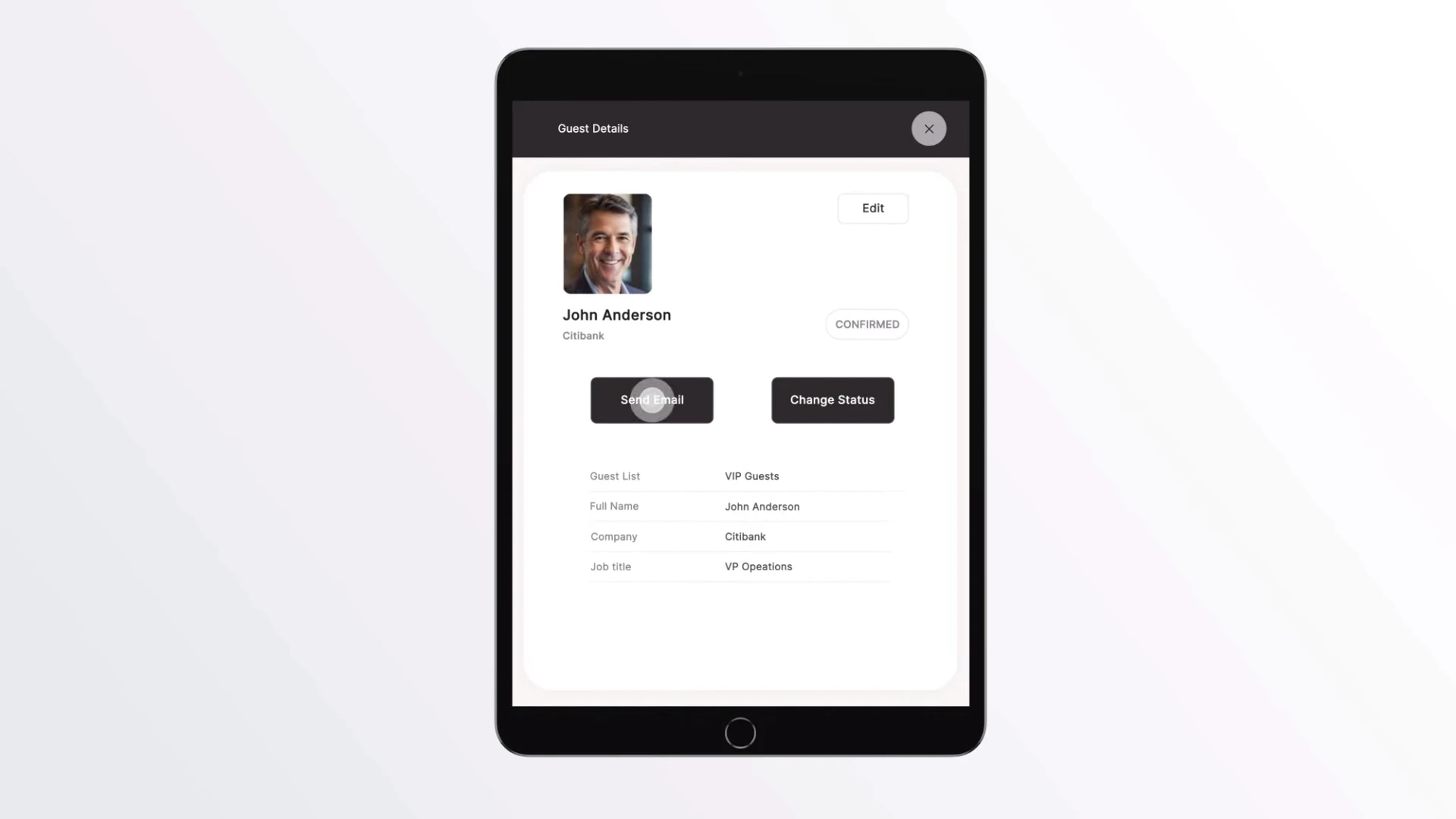
Challenge: Check-in Pax needed short website animations to explain its event-management software. Visitors had to understand specific workflows without sound, with each animation fitting naturally into the surrounding page design.
Solution: Built UI sequences showing how staff find guests, navigate activity history, and resend invitations. Animated the actual product interface, matched the backgrounds to the website, and prepared seamless MP4 loops for embedding.
Result: Delivered a suite of website assets, including an export reduced from a 45 MB master to 2.6 MB. “Also my wife who is not into events understood the concept right away.” — Boris Barreck, Founder / Product Lead, Check-in Pax.
Challenge: Check-in Pax needed short website animations to explain its event-management software. Visitors had to understand specific workflows without sound, with each animation fitting naturally into the surrounding page design.
Solution: Built UI sequences showing how staff find guests, navigate activity history, and resend invitations. Animated the actual product interface, matched the backgrounds to the website, and prepared seamless MP4 loops for embedding.
Result: Delivered a suite of website assets, including an export reduced from a 45 MB master to 2.6 MB. “Also my wife who is not into events understood the concept right away.” — Boris Barreck, Founder / Product Lead, Check-in Pax.
Challenge: Check-in Pax needed short website animations to explain its event-management software. Visitors had to understand specific workflows without sound, with each animation fitting naturally into the surrounding page design.
Solution: Built UI sequences showing how staff find guests, navigate activity history, and resend invitations. Animated the actual product interface, matched the backgrounds to the website, and prepared seamless MP4 loops for embedding.
Result: Delivered a suite of website assets, including an export reduced from a 45 MB master to 2.6 MB. “Also my wife who is not into events understood the concept right away.” — Boris Barreck, Founder / Product Lead, Check-in Pax.
BEFORE / AFTER
BEFORE / AFTER
From Brand Assets to Homepage Animation
The supplied logo files and a frame from the finished Customers.ai animation.
BEFORE / AFTER
From Brand Assets to Homepage Animation
The supplied logo files and a frame from the finished Customers.ai animation.


Before: Separate SVG logos supplied by the client as source assets for the homepage animation.
After: A frame from the finished animation, showing the logos arranged into five diagonal scrolling strips.
PROJECT BRIEF
Which Feature Needs a Clearer Visual?
Send your page and the feature you want to show. We’ll help define the animation and quote the work.
PROJECT BRIEF
Which Feature Needs a Clearer Visual?
Send your page and the feature you want to show. We’ll help define the animation and quote the work.
USE CASE
Motion for Your Next Website Update
This service fits SaaS teams launching a feature page, refreshing a homepage, or replacing outdated product visuals.
Start with the section where the interaction matters most. That might be an automation setup, an analytics view, or an integration that is difficult to explain in a single image.
For a larger website update, we can scope a coordinated set of animations with consistent timing, framing, and visual treatment.
USE CASE
Motion for Your Next Website Update
This service fits SaaS teams launching a feature page, refreshing a homepage, or replacing outdated product visuals.
Start with the section where the interaction matters most. That might be an automation setup, an analytics view, or an integration that is difficult to explain in a single image.
For a larger website update, we can scope a coordinated set of animations with consistent timing, framing, and visual treatment.
DEFINITION
DEFINITION
What Is SaaS UI Animation?
UI animation uses motion to show interface states, user actions, and the transitions between them. On a SaaS marketing website, it can demonstrate a feature or a short workflow within a page section.
The deliverable can be a rendered video loop or a Lottie animation, depending on the artwork, motion, and website requirements.
Want to compare UI animation with other approaches? See how SaaS explainers, product demos, and UI animation differ, including when a screen recording is enough.
For a narrated video explaining the broader product story, explore our SaaS explainer video service.
DEFINITION
What Is SaaS UI Animation?
UI animation uses motion to show interface states, user actions, and the transitions between them. On a SaaS marketing website, it can demonstrate a feature or a short workflow within a page section.
The deliverable can be a rendered video loop or a Lottie animation, depending on the artwork, motion, and website requirements.
Want to compare UI animation with other approaches? See how SaaS explainers, product demos, and UI animation differ, including when a screen recording is enough.
For a narrated video explaining the broader product story, explore our SaaS explainer video service.
WHY US
WHY US
Why Work With Bulat Visual?
Accurate UI motion, direct collaboration, and files prepared for your website.
Your Product Is the Starting Point
We work from your actual screens, components, and workflows. Framing and detail can be simplified for readability while keeping the feature behavior accurate.
Direct Access to the Designer
You work directly with Bulat, the designer handling the animation. Product questions and feedback reach the person building the asset.
45 MB → 2.6 MB
For Check-in Pax, we optimized website feature loops. One web export was reduced from 45 MB to 2.6 MB while keeping the interface clear and the motion smooth.
WHY US
Why Work With Bulat Visual?
Accurate UI motion, direct collaboration, and files prepared for your website.
Your Product Is the Starting Point
We work from your actual screens, components, and workflows. Framing and detail can be simplified for readability while keeping the feature behavior accurate.
Direct Access to the Designer
You work directly with Bulat, the designer handling the animation. Product questions and feedback reach the person building the asset.
45 MB → 2.6 MB
For Check-in Pax, we optimized website feature loops. One web export was reduced from 45 MB to 2.6 MB while keeping the interface clear and the motion smooth.
FORMATS
UI Animations for Your SaaS Website
Hero animations, feature loops, and workflow sequences that show visitors how your product works.
FORMATS
UI Animations for Your SaaS Website
Hero animations, feature loops, and workflow sequences that show visitors how your product works.
Hero Animations
A focused product sequence for the first screen of your homepage or landing page, built around the capability your headline introduces.
Feature Section Loops
Short animations showing a specific action and result, such as assigning a task, sending an invitation, or generating a report.
Workflow Sequences
Connected steps that show how a task moves through your product, from the initial input to the final confirmation.
Dashboard Animations
Animated filters, chart updates, and selected data views that make an analytics feature easier to demonstrate.
Integration Flows
Visual sequences showing what moves between connected tools and where it appears in your interface.
Feature Launch Assets
Animations for release pages and announcements, with additional crops for other marketing placements scoped when needed.
Hero Animations
A focused product sequence for the first screen of your homepage or landing page, built around the capability your headline introduces.
Feature Section Loops
Short animations showing a specific action and result, such as assigning a task, sending an invitation, or generating a report.
Workflow Sequences
Connected steps that show how a task moves through your product, from the initial input to the final confirmation.
Dashboard Animations
Animated filters, chart updates, and selected data views that make an analytics feature easier to demonstrate.
Integration Flows
Visual sequences showing what moves between connected tools and where it appears in your interface.
Feature Launch Assets
Animations for release pages and announcements, with additional crops for other marketing placements scoped when needed.
PROCESS
From Product Screens to Website Animation
Four steps, from your UI to the final export.
PROCESS
From Product Screens to Website Animation
Four steps, from your UI to the final export.
01 / 04
Review the Page and Feature
Share the target page, product screens, and the feature you want to explain. We agree on the key interaction, placement, and deliverables.
02 / 04
Plan the Sequence
We map the actions and screen states, then establish framing and timing. You review the sequence before detailed animation begins.
03 / 04
Animate and Review
We animate the approved screens and share a motion preview. Feedback focuses on product accuracy, pacing, readability, and how the loop resets.
04 / 04
Export and Handoff
We prepare the agreed files for your website team. Formats, dimensions, and any additional versions are confirmed in the project scope.
01 / 04
Review the Page and Feature
Share the target page, product screens, and the feature you want to explain. We agree on the key interaction, placement, and deliverables.
02 / 04
Plan the Sequence
We map the actions and screen states, then establish framing and timing. You review the sequence before detailed animation begins.
03 / 04
Animate and Review
We animate the approved screens and share a motion preview. Feedback focuses on product accuracy, pacing, readability, and how the loop resets.
04 / 04
Export and Handoff
We prepare the agreed files for your website team. Formats, dimensions, and any additional versions are confirmed in the project scope.
01 / 04
Review the Page and Feature
Share the target page, product screens, and the feature you want to explain. We agree on the key interaction, placement, and deliverables.
02 / 04
Plan the Sequence
We map the actions and screen states, then establish framing and timing. You review the sequence before detailed animation begins.
03 / 04
Animate and Review
We animate the approved screens and share a motion preview. Feedback focuses on product accuracy, pacing, readability, and how the loop resets.
04 / 04
Export and Handoff
We prepare the agreed files for your website team. Formats, dimensions, and any additional versions are confirmed in the project scope.
ASSETS
From Figma to UI Motion
From Figma to UI Motion
We prepare your screens, components, and brand assets for animation that matches your product.
Work From Your Existing Interface
Work From Your Existing Interface
Share your Figma screens, components, fonts, and brand guidelines. We prepare the layers for animation and identify any missing screen states before production.
Build From Approved Pre-Launch Designs
Build From Approved Pre-Launch Designs
We can animate approved Figma designs or wireframes before the product goes live. Your team confirms the intended behavior so the animation reflects what you plan to ship.
DELIVERY
Files Prepared for Your Website
Formats, supporting assets, and playback guidance matched to your website setup.
DELIVERY
Files Prepared for Your Website
Formats, supporting assets, and playback guidance matched to your website setup.
Lottie for Vector Motion
For vector animations suited to Lottie, we prepare the files and check that the planned effects work with your website’s chosen player.
MP4 and WebM Exports
We export UI sequences in MP4 or WebM, with dimensions and compression set for the animation’s placement on your website.
Posters and Handoff Details
Poster frames, static alternatives, and handoff notes are included as needed. Your web team receives the agreed formats and playback guidance.
Lottie for Vector Motion
For vector animations suited to Lottie, we prepare the files and check that the planned effects work with your website’s chosen player.
MP4 and WebM Exports
We export UI sequences in MP4 or WebM, with dimensions and compression set for the animation’s placement on your website.
Posters and Handoff Details
Poster frames, static alternatives, and handoff notes are included as needed. Your web team receives the agreed formats and playback guidance.
DELIVERABLES
What's Included
Your fixed quote sets out the deliverables before production:
• Custom animation of the approved UI sequence.
• Final files in the agreed formats and dimensions.
• Poster frames and static alternatives specified in the scope.
• Desktop or mobile versions where included.
• Handoff details for your website team.
• Commercial usage terms and the agreed revision rounds.
Organized After Effects source files are available on request. Let us know before production if your team needs editable files for future updates.
DELIVERABLES
What's Included
Your fixed quote sets out the deliverables before production:
• Custom animation of the approved UI sequence.
• Final files in the agreed formats and dimensions.
• Poster frames and static alternatives specified in the scope.
• Desktop or mobile versions where included.
• Handoff details for your website team.
• Commercial usage terms and the agreed revision rounds.
Organized After Effects source files are available on request. Let us know before production if your team needs editable files for future updates.
PRICING
A Fixed Quote for Your Animation Scope
PRICING
A Fixed Quote for Your Animation Scope
These are scope categories, not quality tiers. Every project receives a fixed quote before production begins.
Short UI Animation
From $750
From $750
One focused UI interaction or short loop using existing UI.
1–2 screens or UI areas
A small number of meaningful states
Up to about 30 seconds
Focused UI Sequence
From $1,500
From $1,500
One connected product workflow.
Multiple related screens or UI states
Planned interactions and transitions
Feature walkthroughs
Complex UI Animation
From $2,500
From $2,500
Multiple animations or a more involved sequence.
Multiple workflows or substantial UI rebuilding
Significant custom illustration or 3D
Animation series
An extra export, cutdown, aspect ratio, a few additional states, or a small illustration does not automatically make a project complex.
FIT & EXPECTATIONS
Is This the Right Fit for Your Team?
Is This the Right Fit for Your Team?
For teams with a feature to explain or a website design ready for motion.
Product and Marketing Teams
Product and Marketing Teams
You have a feature to communicate and a website section where the animation will live. We help define the sequence and turn your product material into the finished asset.
Web Design Teams & Agencies
Web Design Teams & Agencies
Have the website design ready but need someone to animate the product UI? We work from your Figma files, plan the interactions, and deliver web-ready animation assets for your team to integrate.
COMMON QUESTIONS
SaaS UI Animation FAQ
Answers to common questions about pricing, timelines, file formats, and website integration.
COMMON QUESTIONS
SaaS UI Animation FAQ
Answers to common questions about pricing, timelines, file formats, and website integration.
How much does SaaS UI animation cost?
Short UI animations start at $750. Focused UI sequences built around one connected product workflow start at $1,500. UI animation series and more complex sequences start at $2,500. Final pricing depends on the workflow, UI preparation, visual complexity, versions, and deliverables.
How long does production take?
The schedule is confirmed after reviewing the scope and your available assets. Share your launch date and feedback availability at the start so we can plan production and reviews around them.
What do you need from our team?
The relevant Figma frames or screenshots, a short explanation of the workflow, and the page where the animation will appear. Brand guidelines and examples of your preferred motion style also help.
Can you work without a Figma file?
Yes. Screenshots, product access, or a screen recording can help us understand the workflow. We assess how much interface rebuilding is needed before quoting.
Should we choose Lottie or video?
That depends on the artwork, effects, and how the asset will be used. We review the design and website requirements, then recommend Lottie or a rendered video format for that placement.
Will the animation work without sound?
Website loops are designed to communicate through the interface, timing, and visual emphasis. Voiceover or sound can be scoped separately if you also need a version for another channel.
Can you prepare animations for a Framer website?
Yes. Share the Framer page or design and the way you intend to embed the animation. We prepare the assets around those requirements. Website integration is a separate scope item and should be confirmed before production.
Will animation affect page speed?
Performance depends on the files and how they are loaded and displayed. We optimize the exports for the agreed placement; your web team should test the embedded assets on the actual page, including mobile.
Can you make a mobile version?
Yes. A mobile layout may need different framing or less on-screen detail. Include it in the brief so we can scope the necessary version alongside desktop.
What happens when our interface changes?
Send the revised screens and identify the affected interactions. We can assess an update to the relevant scenes and quote the changes. Source-file delivery can also be agreed if your team plans to maintain the animation.
How is this different from an explainer video?
UI animation demonstrates a feature or short sequence within a website section. An explainer video develops a broader product story, often with narration. We can help choose the format based on the job the asset needs to do.
Do you work with SaaS teams in the US and Europe?
Yes. We work asynchronously with SaaS teams in the US and Europe. We communicate by email or Telegram, share previews, and collect feedback in writing. We don't schedule calls. Review stages and timelines are agreed before production begins.
How much does SaaS UI animation cost?
Short UI animations start at $750. Focused UI sequences built around one connected product workflow start at $1,500. UI animation series and more complex sequences start at $2,500. Final pricing depends on the workflow, UI preparation, visual complexity, versions, and deliverables.
How long does production take?
The schedule is confirmed after reviewing the scope and your available assets. Share your launch date and feedback availability at the start so we can plan production and reviews around them.
What do you need from our team?
The relevant Figma frames or screenshots, a short explanation of the workflow, and the page where the animation will appear. Brand guidelines and examples of your preferred motion style also help.
Can you work without a Figma file?
Yes. Screenshots, product access, or a screen recording can help us understand the workflow. We assess how much interface rebuilding is needed before quoting.
Should we choose Lottie or video?
That depends on the artwork, effects, and how the asset will be used. We review the design and website requirements, then recommend Lottie or a rendered video format for that placement.
Will the animation work without sound?
Website loops are designed to communicate through the interface, timing, and visual emphasis. Voiceover or sound can be scoped separately if you also need a version for another channel.
Can you prepare animations for a Framer website?
Yes. Share the Framer page or design and the way you intend to embed the animation. We prepare the assets around those requirements. Website integration is a separate scope item and should be confirmed before production.
Will animation affect page speed?
Performance depends on the files and how they are loaded and displayed. We optimize the exports for the agreed placement; your web team should test the embedded assets on the actual page, including mobile.
Can you make a mobile version?
Yes. A mobile layout may need different framing or less on-screen detail. Include it in the brief so we can scope the necessary version alongside desktop.
What happens when our interface changes?
Send the revised screens and identify the affected interactions. We can assess an update to the relevant scenes and quote the changes. Source-file delivery can also be agreed if your team plans to maintain the animation.
How is this different from an explainer video?
UI animation demonstrates a feature or short sequence within a website section. An explainer video develops a broader product story, often with narration. We can help choose the format based on the job the asset needs to do.
Do you work with SaaS teams in the US and Europe?
Yes. We work asynchronously with SaaS teams in the US and Europe. We communicate by email or Telegram, share previews, and collect feedback in writing. We don't schedule calls. Review stages and timelines are agreed before production begins.
GET STARTED
Show Your Next Feature in Motion
Show Your Next Feature in Motion
Send your product screens and the page you are working on. We’ll help define the animation, confirm the deliverables, and provide a fixed quote.
GET STARTED
Show Your Next Feature in Motion
Send your product screens and the page you are working on. We’ll help define the animation, confirm the deliverables, and provide a fixed quote.